

https://api.opentype.dev, and where you revoke them. Read this page before you create your first key, and whenever you need to know which key does what or retire one.
Open it at console.opentype.dev/keys. The Playground does not need a key: it runs with your console session. A key is for your own code.
What a key is
OpenType stores only a SHA-256 digest of the secret, never the secret itself, so nobody can show it to you again. A key belongs to the organization you created it in, carries exactly the scopes you chose, and works until it is revoked or its secret is rotated.
Create a key
You need thekeys_write scope, which owners, admins and members hold. Choose + Create key in the page header, or in the empty state if you have no keys yet.
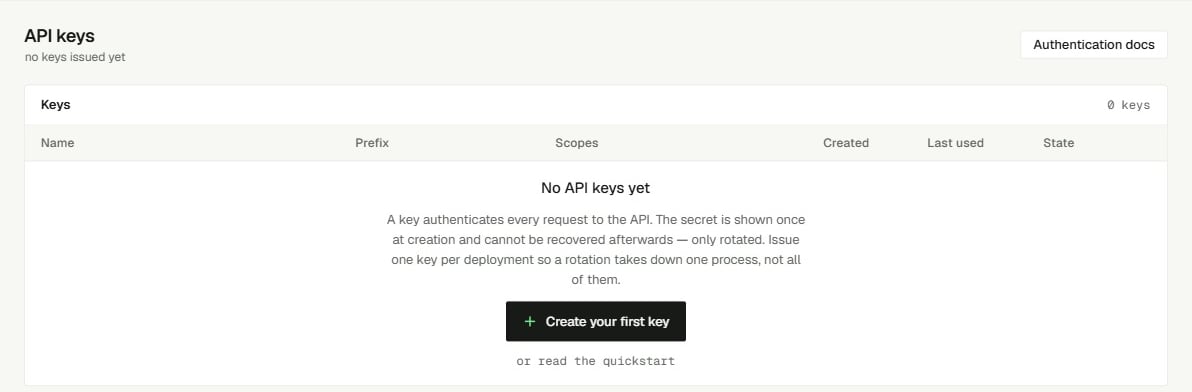
Keys page before the first key
Step 1: name and scopes
The page reads Create key, with Step 1 of 2 · the secret appears on step 2 and is readable only there.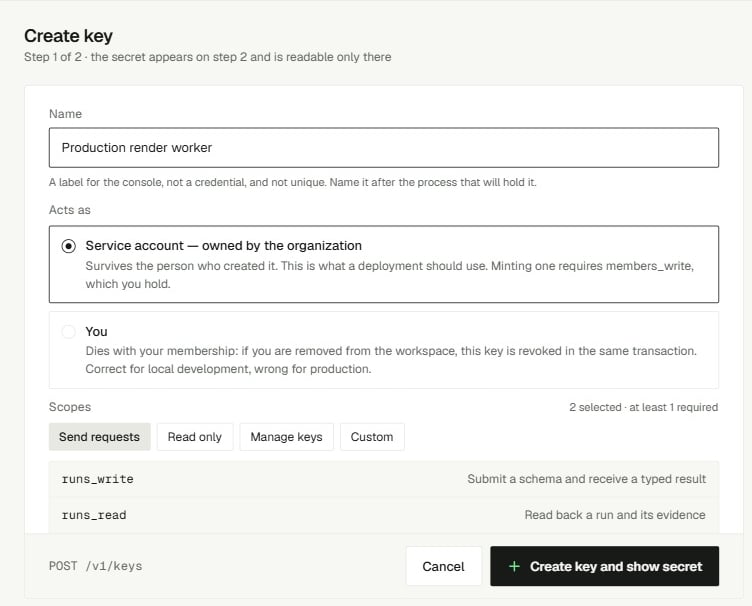
Step 1: a name and a scope set
- Enter a Name, 1 to 80 characters, for example
Production ticket router. It is a label for the console, not a credential: name it after the process that will hold the key. Names do not have to be unique. - Pick Scopes. A scope set ticks its scopes for you; Custom clears them so you tick your own. Ticking boxes by hand switches the set to Custom unless your ticks match a set exactly.
- Choose + Create key and show secret. It reads Creating… while it works. Cancel returns to the list without creating anything.
The console offers six scopes. Each is described next to its checkbox:
A key cannot hold a scope your own role does not hold. The console does not offer
members_read, members_write or billing_write; a key that needs billing_write to buy credit or change auto-recharge is created through the API. Give each key the fewest scopes it needs; see API key security and Scopes.
Step 2: copy the secret
The next screen is the only time the secret is readable.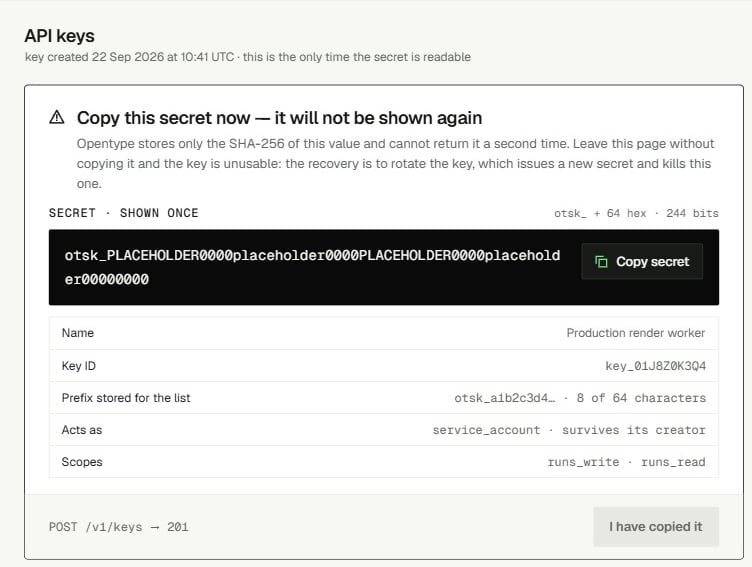
Step 2: the secret, shown once
- Read the warning: [!] Copy this secret now — it will not be shown again. Only the SHA-256 of this value is stored. Leave this page without copying it and the key is unusable: revoke it and create another.
- Choose Copy secret next to
secret · shown once. The button changes to Copied. - Put the secret where your code reads it: a secret manager, or an environment variable on the server, never in source control or in browser code.
- Choose I have copied it. It stays disabled until you have copied the secret; hovering it says Copy the secret first.
Test the key
The test it snippet sends one small decision run with the new key. Here it is in three languages. The key needsruns_write, and the run is charged to your organization like any other.
200 with "state": "completed" means the key works. A 401 invalid_credential means the secret was not copied whole: it must be otsk_ plus exactly 64 hex characters. A 403 scope_denied means the key lacks runs_write.
Read the keys table
With at least one key, the page shows the Keys table (revoked keys stay listed — the row is the audit trail). The header counts them: 3 keys, 2 active and 1 revoked · a secret is shown once at creation and never again. Keys are listed newest first, all on one page.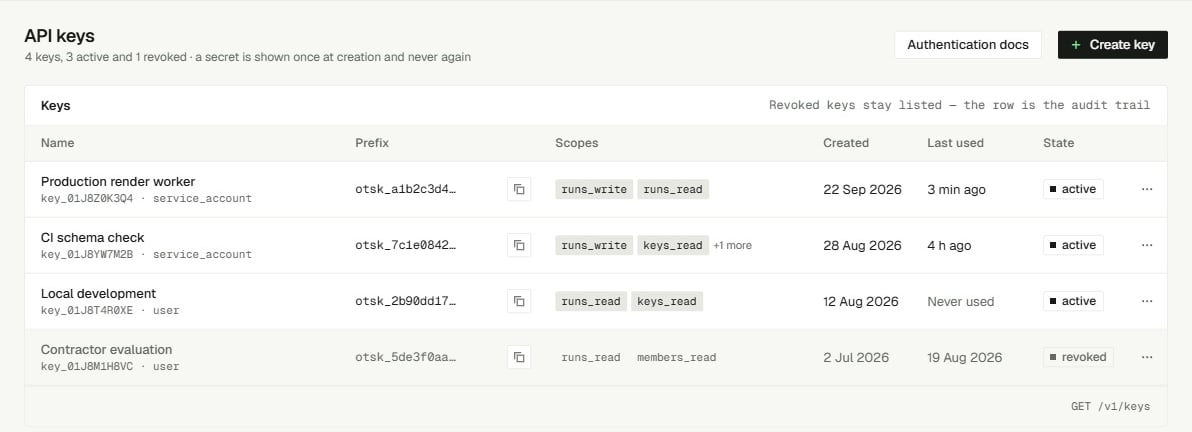
The keys table, with active and revoked keys
Last used is updated at most about once a minute per key, so a key in steady use can read a minute or so behind. A key that reads Never used long after you deployed it is either not deployed or not being sent.
Below the table, Use a key (keep it server-side) repeats a
curl example for POST /v1/runs.
Revoke a key
Revoke a key when it may have leaked, when the process that held it is retired, or when you have replaced it. You needkeys_write.
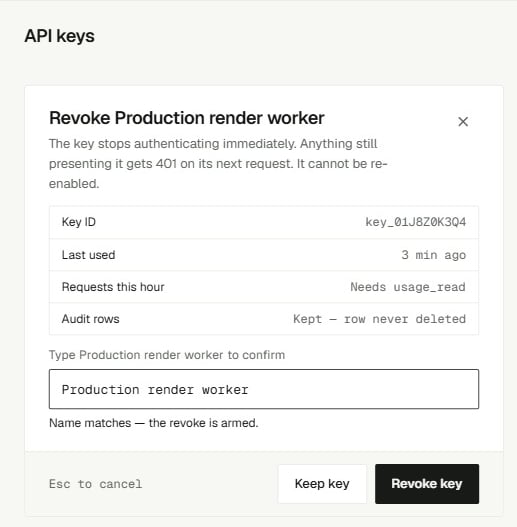
The revoke dialog
- Choose Revoke… at the end of the key’s row. Only active keys have it.
- The dialog asks Revoke “Production ticket router”? and warns: otsk_fde66231… stops working on its next request. This cannot be undone; the row stays listed.
- Choose Revoke key (it reads Revoking…), or Cancel.
401 invalid_credential, the same answer as for a secret that never existed. A revoked key cannot be turned back on or rotated: create a new one. Its row stays in the table, dimmed and marked revoked, as an audit trail; it is never deleted.
If revoking fails, the dialog shows [!] not revoked: and the error code, and the key stays active.
Rotate a key
The console has no rotate button. To replace a key’s secret while keeping its ID, name and scopes, callPOST /v1/keys/{key_id}/rotate: the old secret stops working the moment the new one is issued, with no overlap. To change keys without any gap, create a second key in the console, deploy it, then revoke the first. Key rotation covers both.
Do the same from code
Everything on this page is also available through the API with a credential that holdskeys_read or keys_write, for example a key created with the Manage keys set.
201:
{"keys": [...]} with the same fields and no secret. Revoking answers 200 with the key in state revoked and its revoked_at; revoking it again returns the same record.
What goes wrong
The create form shows a refusal under the scopes as[!] followed by the reason.
Related
- API key security - where to keep secrets, least-privilege scopes, and what to do after a leak.
- Key rotation - replace a secret through the API, or swap keys with no downtime.
- Scopes - every scope and the routes it unlocks.
- Authentication - how the API checks a key on each request.
- Quickstart - use your new key to send a first decision run.