

Anatomy of a key
A key has an id, a secret and a display prefix. Only the secret is a credential.
The
otsk_ prefix makes a leaked secret easy to find with a secret scanner. The 64 hex characters that follow are randomly generated.
What OpenType stores
- Verification hashes the secret you send and compares digests in constant time.
- The server never writes the secret to its logs.
- Because only the digest is kept, OpenType cannot show you a secret again, and neither can anyone who reads the stored key data.
The secret is shown once
The plaintext secret appears in exactly two responses:
Put the secret in a secret manager, or your platform’s encrypted environment variables, before you do anything else with the response. If you lose it, you cannot recover it: rotate the key or create a new one.
Create a key
This creates a key that can send runs and read them back. The calling credential needskeys_write. See Scopes and roles for choosing scopes.
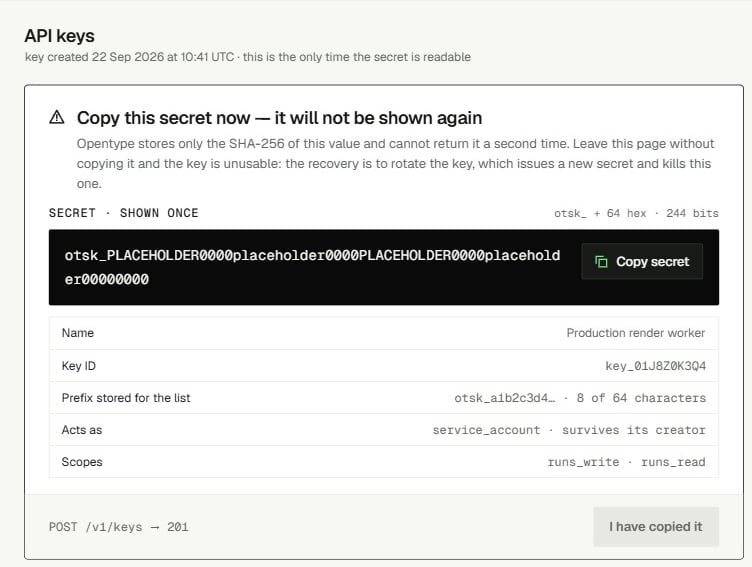
Key object fields
There is no
expires_at: keys do not expire.
Lifecycle rules
Find unused keys
List every key in your organization and look atstate and last_used_at. This needs keys_read. The list is newest first and never contains secrets.
Revoke a key
DELETE /v1/keys/{key_id} needs keys_write. Pass the key_ id, never the secret.
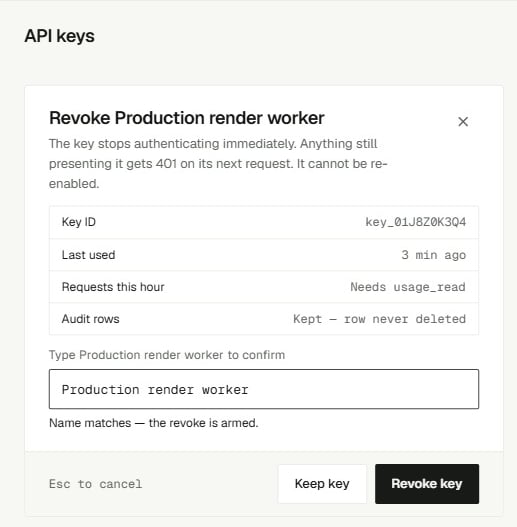
Rotate a key
POST /v1/keys/{key_id}/rotate issues a new secret for the same key. The id, name and scopes stay the same, and the response carries the new secret once. Rotation is available through the API only.
If a secret leaks
A secret counts as leaked once it has been anywhere other than your secret store and theAuthorization header of a request to https://api.opentype.dev: a commit, a chat message, a ticket, a log line, a screenshot, a URL, or client-side code.
1
Find the key
Match the first 13 characters of the leaked value against
secret_prefix in GET /v1/keys or in the console key list. Note its id.2
Kill the leaked secret
If you can redeploy right away, rotate the key. The leaked secret stops working immediately and the key keeps its id and scopes. If you cannot redeploy right away, create a replacement key first, deploy it, then revoke the leaked one. Every minute in between, the leaked secret still works.
3
Deploy the new secret
Update every process that held the old secret. Watch for
401 invalid_credential in your logs, which shows a process you missed.4
Check what it did
Review usage and the run list for activity you do not recognize, and look at the key’s
last_used_at.5
Remove the copy
Delete the secret from wherever it leaked. Removing it from git history alone is not enough, because the secret stays valid until you complete step 2.
A secret in a URL path
Key routes take thekey_ id in the path. If the path value starts with otsk_, the request is refused before any lookup:
400 secret_in_path as a leak. URLs end up in access logs, proxy logs and browser history, so rotate that key now, then fix the code to pass the id field.
Key route errors
Storage checklist
- Keep secrets in a secret manager or encrypted environment variables, never in source control or container images.
- Never send a key to a browser or a mobile app. Call OpenType from your server.
- Log the key
idorsecret_prefix, never the secret. ScrubAuthorizationheaders from your own request logs. - Use one key per process and environment, named after what holds it, so you can revoke one without touching the others.
- Add a secret scanner rule for
otsk_[0-9a-f]{64}to your repositories and CI.
Related
- Key rotation - the overlap pattern and the rotate endpoint, step by step.
- Console API keys - create and revoke keys in the console.
- Scopes and roles - decide which scopes a new key should get.
- secret_in_path - the full entry for a secret sent in a URL.
- Authentication - how a key is checked on every request.