> ## Documentation Index
> Fetch the complete documentation index at: https://docs.opentype.dev/llms.txt
> Use this file to discover all available pages before exploring further.
# Usage in the console
> Read runs, tokens, spend and error rate over 24h, 7d or 30d on the console's Usage page, plus the period quota and one log row per model call.
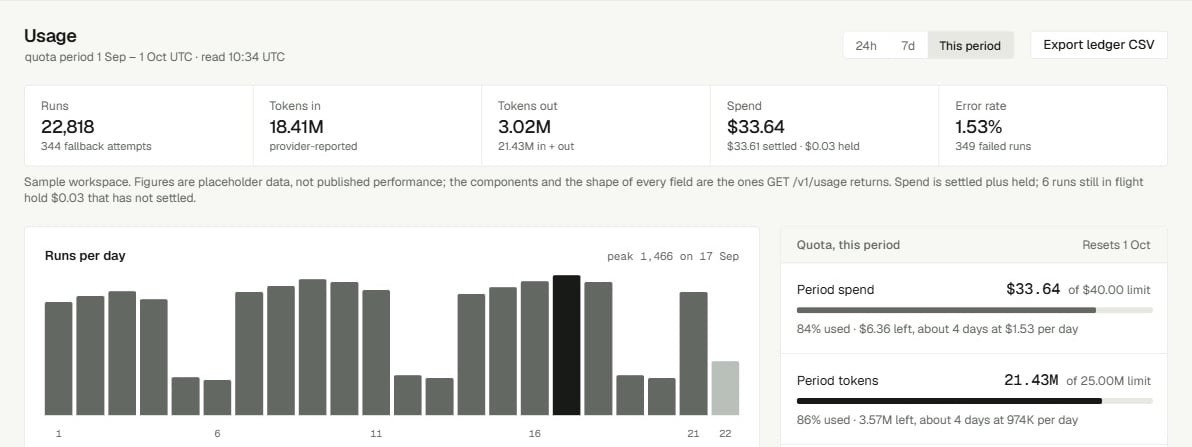
The **Usage** page shows what your organization ran and spent: totals for a time range, a runs-per-day chart, spend by model, the quota for the current period, and a request log with one row per model call. Use it to check what a run cost, to see how close you are to a spend limit, or to find a failed run.
Open it at [console.opentype.dev/usage](https://console.opentype.dev/usage). It needs the `usage_read` scope, which every role holds. Every figure comes from the same usage routes your code can call, listed at the end of this page.
 ## Pick a range
The range tabs in the header are **24h**, **7d** and **30d**; **30d** is the default. Ranges count whole UTC days up to now:
| Tab | Covers |
| ------- | ------------------------------------------- |
| **24h** | Today, from 00:00 UTC until now |
| **7d** | The last 6 whole UTC days and today so far |
| **30d** | The last 29 whole UTC days and today so far |
The line under the title states the exact window, for example *last 7d · 2026-09-18 to 2026-09-24 14:05 UTC · counted from settled accounting rows*. The range applies to the totals, the chart, spend by model and the request log. It does not apply to **Quota, this period**, which always covers the current calendar month.
## Totals
Five figures sit across the top.
| Figure | What it counts | The line under it |
| -------------- | ---------------------------------------------------------------- | ---------------------------------------------------- |
| **Runs** | Runs created in the range | How many completed, and how many are still in flight |
| **Tokens in** | Input tokens over those runs | *provider-reported or estimated* |
| **Tokens out** | Output tokens over those runs | Tokens in and out together |
| **Spend** | Settled spend plus what in-flight runs still hold, in US dollars | The settled part, and the part held |
| **Error rate** | Failed runs as a share of all runs, such as `1.5%` | How many runs failed |
Amounts under a cent show four decimals, such as `$0.0019`, so small spend does not read as `$0.00`. A single decision run can cost less than $0.0001, which shows as `$0.0000\`. See [Models and pricing](/getting-started/models-and-pricing) for the price per token.
## Runs per day
**Runs per day** has one bar per UTC day in the range, scaled to the busiest day; its meta shows that peak, such as `peak 214 · UTC`. Hover a bar to see its date, its run count and its spend. Days with no runs are drawn flat rather than skipped. The last bar is today, labelled `partial` because the day is not over.
## Spend by model
**Spend by model** groups the request log by model. It has one row today: **Neon 1.1**, served by OpenType.
| Column | Meaning |
| ------------ | --------------------------------------------- |
| **Model** | The model name, with who served it underneath |
| **Attempts** | Model calls in the log |
| **Tokens** | Input and output tokens together |
| **Spend** | What those calls cost |
Its meta says what it is built from, such as `from the last 200 attempts`: it adds up the same rows as the request log, so in a busy range it covers the newest 200 calls rather than the whole range. The **Spend** total at the top always covers the whole range.
## Quota, this period
**Quota, this period** shows where the organization stands against its limits for the current quota period, the calendar month in UTC. Its meta shows when the period ends, such as `resets 2026-10-01`.
| Row | What it shows |
| ----------------------- | ----------------------------------------------------------------------------------------------- |
| **Period spend** | Spend this period, settled plus held, with the limit beside it (`of $50.00`), or *no limit set* |
| **Period tokens** | Tokens this period, with the limit beside it, or *no limit set* |
| **Per-request ceiling** | The most a single run may cost, at most \$0.02. Each run holds this much while it is in flight |
| **Held, not settled** | What runs still in flight are holding |
The panel reads the same figures the API checks when it admits a run, so this panel and a refusal never disagree. When a run would pass the period's spend or token limit, `POST /v1/runs` refuses it with `429 organization_spend_quota_exhausted` or `429 organization_token_quota_exhausted`, before anything is read or charged. The limits reset at the start of the next period. See [Spend limits and quotas](/guides/spend-limits-and-quotas).
The same period spend appears in the sidebar as **Spend this period**, against the cap.
## Request log
The **Request log** has one row per model call, newest first, from an append-only record: rows are added, never changed. It shows the newest 200 calls in the range; the count above it reads, for example, `37 of 200 attempts`. A run usually makes one call; a run that was retried has one row per attempt.
| Column | What it shows |
| ------------------- | -------------------------------------------------------------- |
| **Run · attempt** | The run ID, with `attempt 0`, `attempt 1` and so on underneath |
| **Model** | `Neon 1.1`, with `OpenType` underneath |
| **Status** | `succeeded` or `failed` |
| **Tokens in / out** | Input and output tokens for this call |
| **Cost** | What this call cost |
| **Created, UTC** | When the call was made, such as `09-24 14:02:11` |
### Filter the log
The filter bar above the log narrows the rows already loaded:
* **Run ID**: a search box (placeholder `run_…`) that matches any part of the run ID.
* **Status**: `Status: any`, or a status from the rows loaded, such as `failed`.
* **Model**: `Model: any`, or `Neon 1.1`.
Choose **Apply** to filter and **Clear filters** to reset. The range and filters stay in the page address, so you can bookmark or share a filtered view.
The log prints run IDs with hyphens, `run_a4314b6c-c08f-4bd8-8140-99a613abeb44`, while the Playground and `POST /v1/runs` print them without, `run_a4314b6cc08f4bd8814099a613abeb44`. Both name the same run, and `GET /v1/usage/runs/{run_id}` accepts both. To find a run in the log, search for `run_` plus its first 8 characters, such as `run_a4314b6c`, which are the same in both forms.
With filters that match nothing, the log reads **No attempt matches these filters**: clear a filter or widen the range. With no calls in the range at all, it reads **No attempt in this window**.
## A new organization
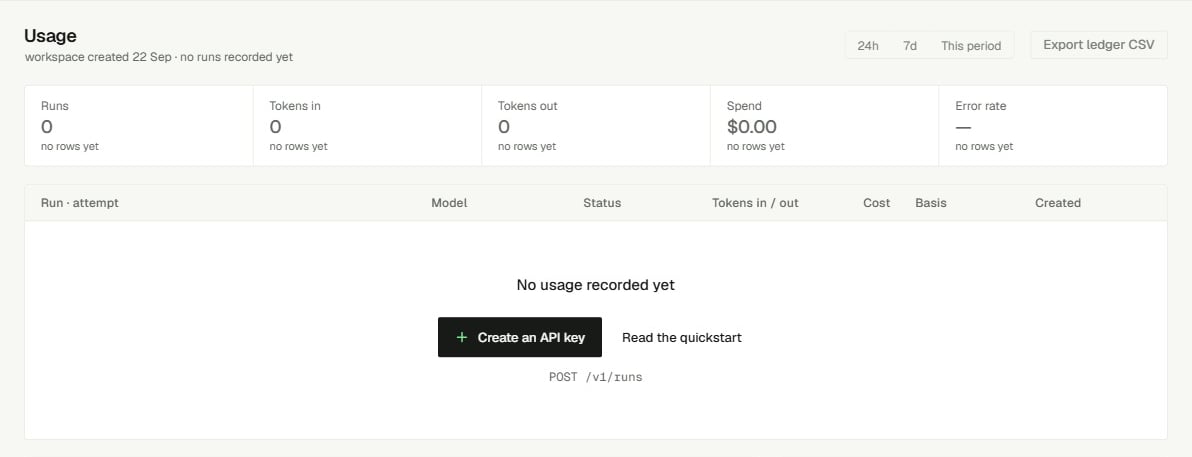
Until the organization has run anything in the range, the totals are replaced by **No usage recorded yet**: *Usage is written when a run settles. Send a request from the Playground or with an API key and this page fills in.* Choose **Open the Playground** to run one.
## Pick a range
The range tabs in the header are **24h**, **7d** and **30d**; **30d** is the default. Ranges count whole UTC days up to now:
| Tab | Covers |
| ------- | ------------------------------------------- |
| **24h** | Today, from 00:00 UTC until now |
| **7d** | The last 6 whole UTC days and today so far |
| **30d** | The last 29 whole UTC days and today so far |
The line under the title states the exact window, for example *last 7d · 2026-09-18 to 2026-09-24 14:05 UTC · counted from settled accounting rows*. The range applies to the totals, the chart, spend by model and the request log. It does not apply to **Quota, this period**, which always covers the current calendar month.
## Totals
Five figures sit across the top.
| Figure | What it counts | The line under it |
| -------------- | ---------------------------------------------------------------- | ---------------------------------------------------- |
| **Runs** | Runs created in the range | How many completed, and how many are still in flight |
| **Tokens in** | Input tokens over those runs | *provider-reported or estimated* |
| **Tokens out** | Output tokens over those runs | Tokens in and out together |
| **Spend** | Settled spend plus what in-flight runs still hold, in US dollars | The settled part, and the part held |
| **Error rate** | Failed runs as a share of all runs, such as `1.5%` | How many runs failed |
Amounts under a cent show four decimals, such as `$0.0019`, so small spend does not read as `$0.00`. A single decision run can cost less than $0.0001, which shows as `$0.0000\`. See [Models and pricing](/getting-started/models-and-pricing) for the price per token.
## Runs per day
**Runs per day** has one bar per UTC day in the range, scaled to the busiest day; its meta shows that peak, such as `peak 214 · UTC`. Hover a bar to see its date, its run count and its spend. Days with no runs are drawn flat rather than skipped. The last bar is today, labelled `partial` because the day is not over.
## Spend by model
**Spend by model** groups the request log by model. It has one row today: **Neon 1.1**, served by OpenType.
| Column | Meaning |
| ------------ | --------------------------------------------- |
| **Model** | The model name, with who served it underneath |
| **Attempts** | Model calls in the log |
| **Tokens** | Input and output tokens together |
| **Spend** | What those calls cost |
Its meta says what it is built from, such as `from the last 200 attempts`: it adds up the same rows as the request log, so in a busy range it covers the newest 200 calls rather than the whole range. The **Spend** total at the top always covers the whole range.
## Quota, this period
**Quota, this period** shows where the organization stands against its limits for the current quota period, the calendar month in UTC. Its meta shows when the period ends, such as `resets 2026-10-01`.
| Row | What it shows |
| ----------------------- | ----------------------------------------------------------------------------------------------- |
| **Period spend** | Spend this period, settled plus held, with the limit beside it (`of $50.00`), or *no limit set* |
| **Period tokens** | Tokens this period, with the limit beside it, or *no limit set* |
| **Per-request ceiling** | The most a single run may cost, at most \$0.02. Each run holds this much while it is in flight |
| **Held, not settled** | What runs still in flight are holding |
The panel reads the same figures the API checks when it admits a run, so this panel and a refusal never disagree. When a run would pass the period's spend or token limit, `POST /v1/runs` refuses it with `429 organization_spend_quota_exhausted` or `429 organization_token_quota_exhausted`, before anything is read or charged. The limits reset at the start of the next period. See [Spend limits and quotas](/guides/spend-limits-and-quotas).
The same period spend appears in the sidebar as **Spend this period**, against the cap.
## Request log
The **Request log** has one row per model call, newest first, from an append-only record: rows are added, never changed. It shows the newest 200 calls in the range; the count above it reads, for example, `37 of 200 attempts`. A run usually makes one call; a run that was retried has one row per attempt.
| Column | What it shows |
| ------------------- | -------------------------------------------------------------- |
| **Run · attempt** | The run ID, with `attempt 0`, `attempt 1` and so on underneath |
| **Model** | `Neon 1.1`, with `OpenType` underneath |
| **Status** | `succeeded` or `failed` |
| **Tokens in / out** | Input and output tokens for this call |
| **Cost** | What this call cost |
| **Created, UTC** | When the call was made, such as `09-24 14:02:11` |
### Filter the log
The filter bar above the log narrows the rows already loaded:
* **Run ID**: a search box (placeholder `run_…`) that matches any part of the run ID.
* **Status**: `Status: any`, or a status from the rows loaded, such as `failed`.
* **Model**: `Model: any`, or `Neon 1.1`.
Choose **Apply** to filter and **Clear filters** to reset. The range and filters stay in the page address, so you can bookmark or share a filtered view.
The log prints run IDs with hyphens, `run_a4314b6c-c08f-4bd8-8140-99a613abeb44`, while the Playground and `POST /v1/runs` print them without, `run_a4314b6cc08f4bd8814099a613abeb44`. Both name the same run, and `GET /v1/usage/runs/{run_id}` accepts both. To find a run in the log, search for `run_` plus its first 8 characters, such as `run_a4314b6c`, which are the same in both forms.
With filters that match nothing, the log reads **No attempt matches these filters**: clear a filter or widen the range. With no calls in the range at all, it reads **No attempt in this window**.
## A new organization
Until the organization has run anything in the range, the totals are replaced by **No usage recorded yet**: *Usage is written when a run settles. Send a request from the Playground or with an API key and this page fills in.* Choose **Open the Playground** to run one.
 A run shows up in the totals as soon as it is created, and its cost once it settles, which for a decision run is when its answer comes back.
## When figures are missing
The page never shows a figure it could not read as zero.
| You see | What it means | What to do |
| -------------------------------------------------------------- | -------------------------------------------------------------------------------- | ------------------------------------------------------------------------------------------------------------------ |
| **The usage rollup could not be read**, with a status and code | The totals could not be loaded. *Figures are withheld rather than shown as zero* | Reload. If it persists, look the code up in [Errors](/reference/errors) |
| `[!] Daily usage unavailable: 503 database_unavailable` | One panel could not be loaded; the rest of the page still works | Reload in a moment |
| `[!] Quota unavailable: …` or `[!] The ledger unavailable: …` | The same, for the quota or the request log | Reload in a moment |
| `403 scope_denied` | Your credential lacks `usage_read` | Every role holds it; sign out and in again, or check the key's scopes. See [scope\_denied](/problems/scope_denied) |
## Read the same figures from code
Each panel is one API route, and all of them need `usage_read`. A key created with the **Read only** set on [API keys](/console/api-keys) has it.
| Panel | Route |
| --------------------------- | ----------------------------------------------------------- |
| Totals | `GET /v1/usage?start_at=…&end_at=…` |
| Runs per day | `GET /v1/usage/daily?start_at=…&end_at=…` (at most 92 days) |
| Request log, Spend by model | `GET /v1/usage/ledger?start_at=…&end_at=…&limit=200` |
| Quota, this period | `GET /v1/quota` |
| One run's cost and attempts | `GET /v1/usage/runs/{run_id}` |
Windows are UTC timestamps in exactly the form `2026-09-01T00:00:00Z`, sent together or not at all. Leaving both out means the current quota period.
```bash cURL theme={"system"}
# Where the organization stands this period
curl -sS https://api.opentype.dev/v1/quota \
-H "Authorization: Bearer $OPENTYPE_API_KEY"
# Totals for September 2026
curl -sS "https://api.opentype.dev/v1/usage?start_at=2026-09-01T00:00:00Z&end_at=2026-10-01T00:00:00Z" \
-H "Authorization: Bearer $OPENTYPE_API_KEY"
```
```ts TypeScript theme={"system"}
const auth = { Authorization: `Bearer ${process.env.OPENTYPE_API_KEY}` };
const quota = await fetch("https://api.opentype.dev/v1/quota", { headers: auth }).then((r) => r.json());
const spent = quota.consumed_spend.settled_micros + quota.consumed_spend.unsettled_micros;
const limit = quota.limits.period_spend_limit_micros; // null when no limit is set
console.log(`spent $${spent / 1e6}`, limit === null ? "no limit" : `of $${limit / 1e6}`);
const params = new URLSearchParams({ start_at: "2026-09-01T00:00:00Z", end_at: "2026-10-01T00:00:00Z" });
const usage = await fetch(`https://api.opentype.dev/v1/usage?${params}`, { headers: auth }).then((r) => r.json());
console.log(usage.runs.total, "runs,", usage.runs.failed, "failed");
```
```python Python theme={"system"}
import os
import requests
auth = {"Authorization": f"Bearer {os.environ['OPENTYPE_API_KEY']}"}
quota = requests.get("https://api.opentype.dev/v1/quota", headers=auth, timeout=30).json()
spent = quota["consumed_spend"]["settled_micros"] + quota["consumed_spend"]["unsettled_micros"]
limit = quota["limits"]["period_spend_limit_micros"] # None when no limit is set
print(f"spent ${spent / 1e6}", "no limit" if limit is None else f"of ${limit / 1e6}")
usage = requests.get(
"https://api.opentype.dev/v1/usage",
params={"start_at": "2026-09-01T00:00:00Z", "end_at": "2026-10-01T00:00:00Z"},
headers=auth,
timeout=30,
).json()
print(usage["runs"]["total"], "runs,", usage["runs"]["failed"], "failed")
```
`GET /v1/usage` answers with the figures behind the totals. Money is integer micro-USD: 1,000,000 is \$1.
```json theme={"system"}
{
"organization_id": "org_example",
"window": {"start_at": "2026-09-01T00:00:00Z", "end_at": "2026-10-01T00:00:00Z"},
"runs": {"total": 3, "completed": 2, "failed": 0, "in_flight": 1},
"tokens": {"input_tokens": 824, "output_tokens": 46, "total_tokens": 870},
"spend": {"reserved_micros": 20038, "settled_micros": 38, "unsettled_micros": 20000}
}
```
Here one run is still in flight and holds $0.02 (`unsettled_micros: 20000`), so **Spend** reads `$0.0200\` (settled plus held) until the run settles. [Usage reporting](/guides/usage-reporting) covers every route and field.
## Related
* [Usage reporting](/guides/usage-reporting) - every usage route, its fields, and how to build your own reports.
* [Spend limits and quotas](/guides/spend-limits-and-quotas) - the period limits, the per-request ceiling, and the 429 refusals.
* [Billing](/console/billing) - the balance that each run's cost is charged against.
* [Models and pricing](/getting-started/models-and-pricing) - the price per token behind every Cost figure.
* [Request IDs](/reference/request-ids) - tie a row in the log to the request your code sent.
A run shows up in the totals as soon as it is created, and its cost once it settles, which for a decision run is when its answer comes back.
## When figures are missing
The page never shows a figure it could not read as zero.
| You see | What it means | What to do |
| -------------------------------------------------------------- | -------------------------------------------------------------------------------- | ------------------------------------------------------------------------------------------------------------------ |
| **The usage rollup could not be read**, with a status and code | The totals could not be loaded. *Figures are withheld rather than shown as zero* | Reload. If it persists, look the code up in [Errors](/reference/errors) |
| `[!] Daily usage unavailable: 503 database_unavailable` | One panel could not be loaded; the rest of the page still works | Reload in a moment |
| `[!] Quota unavailable: …` or `[!] The ledger unavailable: …` | The same, for the quota or the request log | Reload in a moment |
| `403 scope_denied` | Your credential lacks `usage_read` | Every role holds it; sign out and in again, or check the key's scopes. See [scope\_denied](/problems/scope_denied) |
## Read the same figures from code
Each panel is one API route, and all of them need `usage_read`. A key created with the **Read only** set on [API keys](/console/api-keys) has it.
| Panel | Route |
| --------------------------- | ----------------------------------------------------------- |
| Totals | `GET /v1/usage?start_at=…&end_at=…` |
| Runs per day | `GET /v1/usage/daily?start_at=…&end_at=…` (at most 92 days) |
| Request log, Spend by model | `GET /v1/usage/ledger?start_at=…&end_at=…&limit=200` |
| Quota, this period | `GET /v1/quota` |
| One run's cost and attempts | `GET /v1/usage/runs/{run_id}` |
Windows are UTC timestamps in exactly the form `2026-09-01T00:00:00Z`, sent together or not at all. Leaving both out means the current quota period.
```bash cURL theme={"system"}
# Where the organization stands this period
curl -sS https://api.opentype.dev/v1/quota \
-H "Authorization: Bearer $OPENTYPE_API_KEY"
# Totals for September 2026
curl -sS "https://api.opentype.dev/v1/usage?start_at=2026-09-01T00:00:00Z&end_at=2026-10-01T00:00:00Z" \
-H "Authorization: Bearer $OPENTYPE_API_KEY"
```
```ts TypeScript theme={"system"}
const auth = { Authorization: `Bearer ${process.env.OPENTYPE_API_KEY}` };
const quota = await fetch("https://api.opentype.dev/v1/quota", { headers: auth }).then((r) => r.json());
const spent = quota.consumed_spend.settled_micros + quota.consumed_spend.unsettled_micros;
const limit = quota.limits.period_spend_limit_micros; // null when no limit is set
console.log(`spent $${spent / 1e6}`, limit === null ? "no limit" : `of $${limit / 1e6}`);
const params = new URLSearchParams({ start_at: "2026-09-01T00:00:00Z", end_at: "2026-10-01T00:00:00Z" });
const usage = await fetch(`https://api.opentype.dev/v1/usage?${params}`, { headers: auth }).then((r) => r.json());
console.log(usage.runs.total, "runs,", usage.runs.failed, "failed");
```
```python Python theme={"system"}
import os
import requests
auth = {"Authorization": f"Bearer {os.environ['OPENTYPE_API_KEY']}"}
quota = requests.get("https://api.opentype.dev/v1/quota", headers=auth, timeout=30).json()
spent = quota["consumed_spend"]["settled_micros"] + quota["consumed_spend"]["unsettled_micros"]
limit = quota["limits"]["period_spend_limit_micros"] # None when no limit is set
print(f"spent ${spent / 1e6}", "no limit" if limit is None else f"of ${limit / 1e6}")
usage = requests.get(
"https://api.opentype.dev/v1/usage",
params={"start_at": "2026-09-01T00:00:00Z", "end_at": "2026-10-01T00:00:00Z"},
headers=auth,
timeout=30,
).json()
print(usage["runs"]["total"], "runs,", usage["runs"]["failed"], "failed")
```
`GET /v1/usage` answers with the figures behind the totals. Money is integer micro-USD: 1,000,000 is \$1.
```json theme={"system"}
{
"organization_id": "org_example",
"window": {"start_at": "2026-09-01T00:00:00Z", "end_at": "2026-10-01T00:00:00Z"},
"runs": {"total": 3, "completed": 2, "failed": 0, "in_flight": 1},
"tokens": {"input_tokens": 824, "output_tokens": 46, "total_tokens": 870},
"spend": {"reserved_micros": 20038, "settled_micros": 38, "unsettled_micros": 20000}
}
```
Here one run is still in flight and holds $0.02 (`unsettled_micros: 20000`), so **Spend** reads `$0.0200\` (settled plus held) until the run settles. [Usage reporting](/guides/usage-reporting) covers every route and field.
## Related
* [Usage reporting](/guides/usage-reporting) - every usage route, its fields, and how to build your own reports.
* [Spend limits and quotas](/guides/spend-limits-and-quotas) - the period limits, the per-request ceiling, and the 429 refusals.
* [Billing](/console/billing) - the balance that each run's cost is charged against.
* [Models and pricing](/getting-started/models-and-pricing) - the price per token behind every Cost figure.
* [Request IDs](/reference/request-ids) - tie a row in the log to the request your code sent.